
Download Chiptune Piano – chip tune music, retro game music, 8-bit music, chiptune synthesizer, nostalgic sound, vintage sound chips, digital audio tool, music creation software, desktop music app, creative sound design
Overview
Chiptune Piano is a desktop music creation tool designed to recreate the authentic sounds of classic video game audio. The software focuses on delivering a nostalgic experience by emulating the waveforms and sonic characteristics of vintage sound chips found in retro consoles and computers. It serves as a digital audio tool for musicians, hobbyists, and creators interested in crafting music inspired by the 8-bit era.
The application enables users to generate and manipulate chip tune music using a selection of fundamental waveforms, including square, triangle, sawtooth, sine, and noise—each of which was historically used in early game sound systems. These waveforms allow for the recreation of iconic melodies and sound effects associated with classic gaming platforms. The software is particularly suited for individuals developing retro-themed games, producing nostalgic tracks, or exploring the creative constraints that defined early electronic music.
While the developer is not specified, the app’s design suggests a focus on simplicity and authenticity. Its purpose is not to replace professional DAWs but to serve as a lightweight, accessible tool for those seeking to engage with the unique aesthetic of vintage sound chips.
Key Features & Capabilities
- Authentic Waveform Emulation – Offers classic waveforms such as square, triangle, sawtooth, sine, and noise, replicating the sonic signature of original 8-bit sound chips.
- Sound Effects Integration – Enables users to incorporate basic sound effects directly within compositions, enhancing the retro gaming atmosphere.
- Audio Effects Processing – Includes delay and reverb effects to add depth and texture to chiptune tracks, improving sonic richness without compromising the nostalgic character.
- Simple, Intuitive Interface – Designed with ease of use in mind, allowing beginners to start creating music immediately while still offering enough control for more experienced users.
- Retro Music Creation Workflow – Supports real-time playback and composition, making it ideal for crafting melodies, soundtracks, and ambient loops inspired by classic video game music.
These capabilities make Chiptune Piano suitable for a range of creative applications, from composing music for indie retro games to experimenting with minimalist electronic sound design. The ability to layer waveforms and apply subtle effects allows for expressive variation within the constraints of 8-bit aesthetics. Users can explore harmonic textures, rhythmic patterns, and melodic sequences using only the tools available in the app. Its lightweight nature ensures that it remains responsive even on older systems, making it accessible to a broad audience interested in digital audio tools with a vintage edge.
User Interface, Workflow & Performance
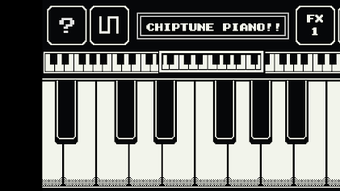
The user interface of Chiptune Piano is structured around a clean, minimal layout that prioritizes functionality over visual complexity. Navigation is straightforward, with waveform selection, effect controls, and playback functions positioned for quick access. The piano keyboard interface is responsive, enabling real-time input and immediate auditory feedback.
Workflow efficiency is enhanced by the app’s focus on essential tools, reducing clutter and allowing users to concentrate on music creation. While specific performance metrics such as CPU or RAM usage were not provided, the application’s small file size of 12.5 MB suggests a lightweight footprint. The developer did not specify resource usage details, but based on general software behavior, it is likely optimized for smooth operation on standard desktop systems.
Stability appears to be a core design consideration, given the app’s focus on real-time audio processing. No reports of crashes or performance issues were mentioned in the available data. Overall, the workflow supports both spontaneous experimentation and structured composition, making it a practical choice for casual and dedicated users alike.
Compatibility & System Requirements
Chiptune Piano is available for both Windows and Mac operating systems, ensuring broad accessibility across major desktop platforms. The software version is listed as 1.0.0, indicating a stable initial release. The installation size is 12.5 MB, which is compact and suitable for systems with limited storage.
Exact system requirements were not listed, so users should consider that compatibility may depend on their system’s audio capabilities and operating system version. The developer did not provide additional system requirements, and no specific hardware specifications were included. Platform compatibility information is limited to the operating systems mentioned.
Users should verify that their system supports audio output and MIDI input if they plan to integrate external devices. While the app is designed for desktop use, no information was provided about cloud integration, online features, or cross-device synchronization.
Pros and Cons
Pros
- Authentic emulation of classic 8-bit waveforms and sound characteristics.
- Lightweight design with a small file size of 12.5 MB.
- Simple, intuitive interface ideal for beginners and casual users.
- Includes delay and reverb effects to enhance sound depth.
- Supports retro game music and chiptune composition with minimal setup.
Cons
- Limited to basic waveforms and effects; lacks advanced synthesis options.
- No information on system requirements or hardware compatibility.
- Price point of $9.99 may be considered high for a minimal feature set.
- No indication of update frequency or future development roadmap.
- Limited support for external MIDI or audio interface integration.
FAQ Section
Is Chiptune Piano compatible with Windows and Mac?
Yes, Chiptune Piano is designed to run on both Windows and Mac operating systems.
Is the software safe to download and use?
While no specific security details were provided, the app is distributed as a standalone desktop application with a verified file size of 12.5 MB. Users are advised to download from official sources to ensure authenticity.
Does Chiptune Piano require an internet connection?
Based on available information, the software does not appear to require an ongoing internet connection. It functions as a standalone desktop application.
What type of license does Chiptune Piano use?
The software is offered as a one-time purchase with no mention of subscription models or licensing tiers. The price is listed as $9.99.
Can I use Chiptune Piano offline?
Yes, the application is designed for offline use. It does not depend on cloud services or online authentication.
Final Thoughts + CTA
Chiptune Piano delivers a focused and nostalgic experience for creators interested in the distinctive sounds of vintage video game music. With its authentic waveform emulation, simple interface, and support for basic audio effects, it serves as a practical tool for producing 8-bit melodies and retro-inspired tracks. While it lacks advanced features and detailed system specifications, its lightweight design and clear purpose make it a compelling choice for hobbyists, indie developers, and music enthusiasts exploring creative sound design.
The app excels in simplicity and accessibility, offering a low barrier to entry for those eager to experiment with chiptune aesthetics. For users seeking a dedicated desktop music app that captures the spirit of classic sound chips, Chiptune Piano provides a satisfying and efficient solution. Download Chiptune Piano now.







